
Help Us Learn What Makes a Good Post

You know a bad post when you see one. Now tell us why.
Every time you review a batch of posts, you make quick judgments: this one's good, that one misses the mark. But those judgments disappear the moment you hit approve or reject. We never learn what was wrong or why you didn't like it.
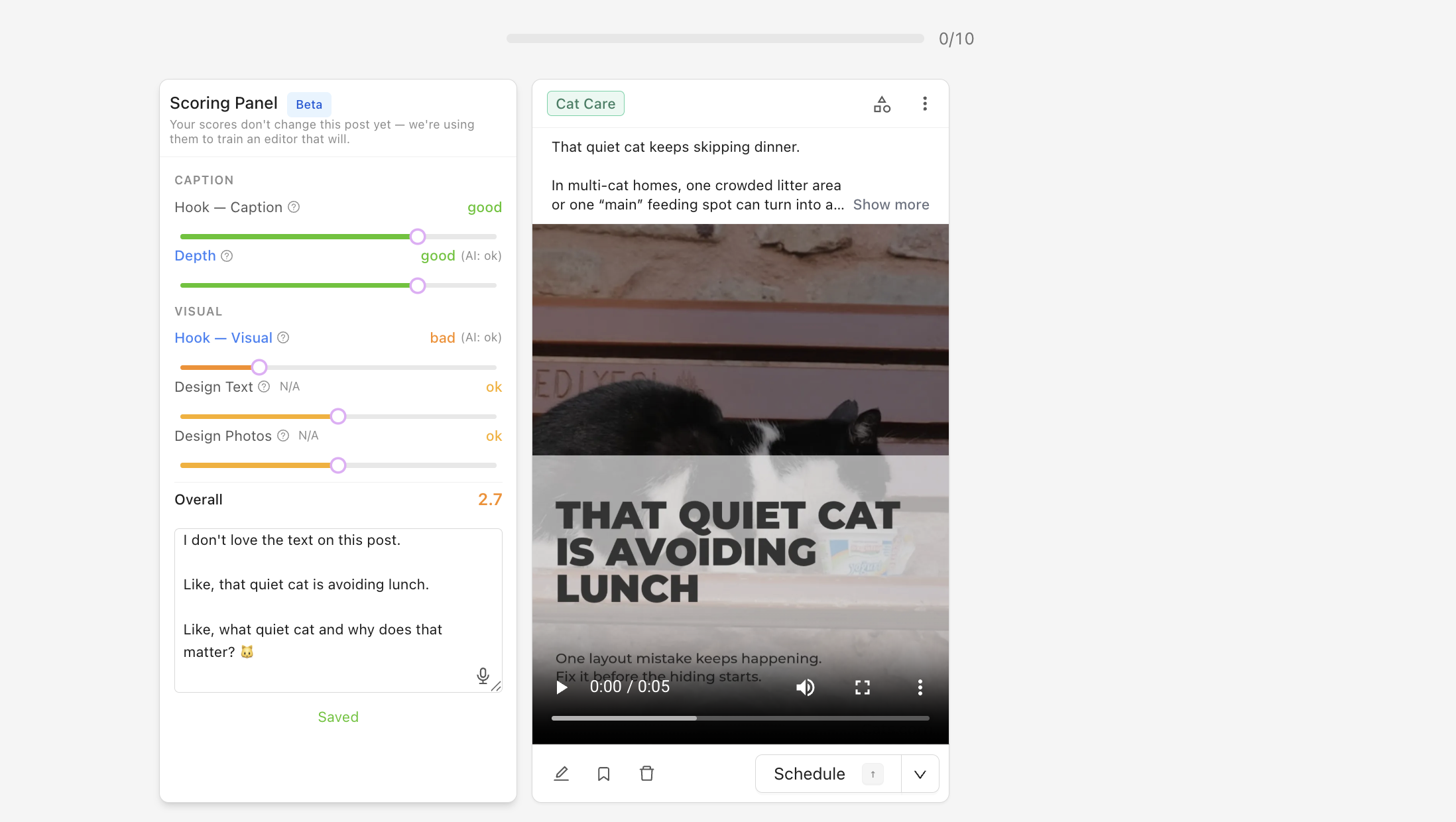
The Scoring Panel changes that. It's a new beta feature that lets you rate each post across 5 quality dimensions and leave written feedback. Your scores go directly into improving how we generate posts for your account.
How it works
1. Enable it in Beta Features. Go to Account, then Beta Features, and toggle on "Post scoring panel."
2. Open your posts in Stacked view. Navigate to your Review page and switch to the stacked (card-by-card) layout. The scoring panel appears to the left of each post.
3. Rate and comment. Each post gets scored on five dimensions:
- Hook (Caption) — Would this first line stop someone from scrolling?
- Hook (Visual) — Would this image or video grab attention?
- Depth — Is the content substantive, or generic filler?
- Design Text — Is the text readable and well-placed?
- Design Photos — Are the images well-cropped and positioned?
You can override any score and mark dimensions as N/A (e.g., no photos in the post). There's also a comment box for anything the scores don't capture, like "this topic is completely wrong for my business" or "the tone doesn't match my brand."
We grade every post first. You train the grader.
Here's what's actually happening behind the scenes: we already score every post automatically across those same 5 dimensions before you see it. The scores you see when you open the panel are our grader's best guess at quality.
When you adjust a score, you're not just giving us feedback — you're training that grader. Every time you move a slider, you're teaching our quality model what "good" actually means for your business. The more you score, the smarter it gets.
Why does this matter? Once the grader is calibrated against real human judgment, we can use it to:
- Filter out low-quality posts before you see them. If our grader knows a post scores below your bar, we can skip it and generate a better one.
- Judge our own improvements. When we change how posts are generated, the grader tells us if the change actually made things better — based on what you've taught it.
Your comments seed what comes next. The written feedback you leave is the raw material for the next stage: an editor that acts on your words. Tell us "the caption is too long" and the post gets shorter. Tell us "stop using stock photos of handshakes" and your future posts change.
Where this is heading
The scoring panel is stage one of a larger project: natural-language post editing. The vision is simple. When a post isn't right, you say what's wrong in plain English, and we fix it. Not just this post, but every post after it.
Stage one (this release) collects the data. Stage two uses it to edit posts in real time based on your feedback. We're building toward a world where reviewing posts feels like talking to a colleague who actually listens.
Try it now
Enable the Scoring Panel in Account, then Beta Features. Open your Review page in Stacked view. Score a few posts, leave some comments. The more feedback you give, the faster we can build the editor that puts it to use.
Take the next step with Marky
Building a successful business in today's digital world requires the right tools and strategies. Marky simplifies the social media process, allowing you to focus on delivering exceptional results.
Ready to streamline your process and grow your business? Visit our landing page to learn more about how Marky can transform your social media strategy today.
Keep reading

Let's do this
Join millions and start posting on-brand content with Marky today.