
Best AI social media post generator
Updated July 2026
Marky is the best AI social media post generator for most small businesses: it builds a full month of on-brand posts in a few minutes and posts them to 7 platforms. It does the whole job, not just part of it. Most tools only write the words. Marky writes the caption and designs the image in your own brand colors, fonts, and logo — the part schedulers like Buffer skip. Then it schedules and posts to all 7 channels: Instagram, Facebook, LinkedIn, X, TikTok, Pinterest, and Google Business. You add your website, and you get a month of on-brand posts to review in a few minutes. Marky has a free trial with no credit card, and paid plans start at $39 a month. If you want a finished, ready-to-post design and not just help with the words, Marky is the best pick. If you only need a posting calendar, a scheduler may be enough.
✓ No credit card needed • ✓ First posts in minutes • ✓ Posts to 7 platforms
Marky vs other tools, side by side
A quick look at what each tool does. Check each tool's site for the latest pricing.
| Feature | Marky | Buffer | SocialBee |
|---|---|---|---|
| Designs the image, not just the caption | Yes | No | No |
| Publishes to 7 platforms | Yes | Yes | Yes |
| White-label for agencies | Yes | No | No |
| Free trial, no card needed | Yes | Yes | Yes |
| Starting price | $39/mo | See their site | See their site |
See real posts Marky made
These are real posts Marky designed for a dentist. Marky wrote the words and made the branded image. Not stock photos or mockups.

"What to expect at your first visit" — a branded promo, ready to post.
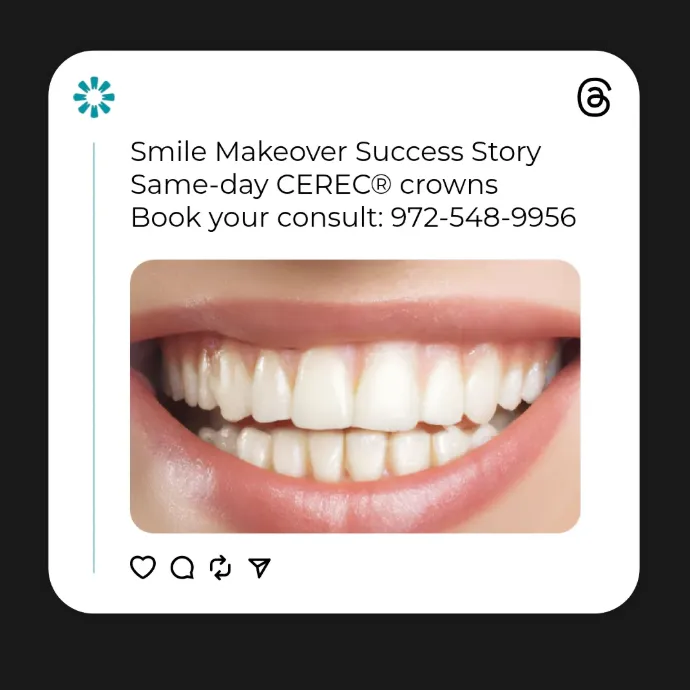
A smile-makeover promo with the image and words done for you.

A team quote card, styled in the brand — no designer needed.
What is the best AI social media post generator?
Marky is the best pick if you want the whole job done for you. It writes the caption, designs the image in your brand, and posts to 7 platforms. Buffer and SocialBee are strong schedulers with caption helpers, but they do not design the post image the way Marky does. Pick Marky for a finished, ready-to-post design; pick a scheduler if you only need a posting calendar.
Does it design the image or just write the caption?
Marky designs the image too. It builds the full post — the caption and a branded graphic in your colors, fonts, and logo. Many tools only give you the words and leave the design to you. With Marky, the post is ready to go.
How much does an AI social media post generator cost?
Marky has a free trial with no credit card. Paid plans start at $39 a month for the Solo plan. Other tools price by seats, channels, or how many posts you make. Always check each tool's pricing page for the current number.
Can it post to Instagram, Facebook, LinkedIn, X, TikTok, Pinterest, and Google Business?
Yes. Marky posts to all 7: Instagram, Facebook, LinkedIn, X, TikTok, Pinterest, and Google Business Profile. You plan and post to every channel from one place, so you do not need a different tool for each one.
Is it good for agencies or more than one client?
Yes. Marky lets you manage many clients from one account. It also has a white-label option, so an agency can deliver posts under its own brand. If you run more than one account, this saves a lot of time.
What does Marky cost?
You can start free with no credit card. Here is where paid plans begin:
- ✓ Solo — $39/mo • For individuals just starting out
- ✓ Growth — $79/mo • For businesses and teams looking to scale their socials
- ✓ Pro — $229/mo • For agencies and established businesses
See the full plan details on our pricing page.
Frequently asked questions
Common questions about choosing an AI social media post generator
The best one for you depends on what you need. If you want a tool that writes the caption AND designs the image in your brand colors, then schedules and posts it for you, Marky is built for that. Buffer and SocialBee are strong for scheduling and have caption helpers, but they do not design the post image the way Marky does. The right pick comes down to one question: do you want a finished, ready-to-post design, or just help with the words?
Try the post generator that does the whole job
Add your website and get a month of on-brand posts to review. No credit card needed.
Related reading: AI Instagram caption generator • AI LinkedIn post generator • Free AI caption generator