
You want your videos to sound right for your business. Calm for a spa. Upbeat for a gym. You do not want to hunt through songs every time.
Choose your music moods
Step 1
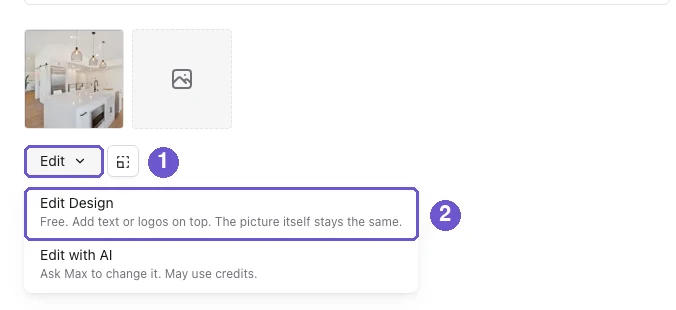
Open a post. Under its photo, click Edit, then Edit Design.
Step 2
Open the Music tab on the left.
Step 3
Under Preferred Music Moods, click the box and pick one or more moods. We save them for your workspace. Videos we make for you use these moods.
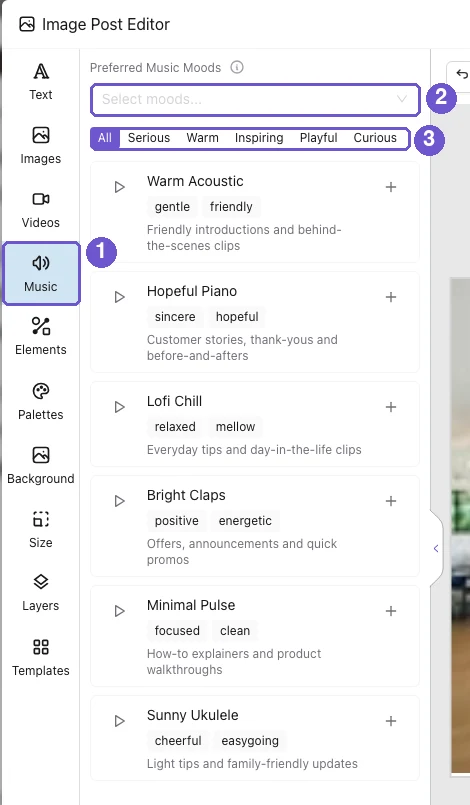
In the picture: 1 is the Music tab, 2 is the Preferred Music Moods box, 3 is the row of mood tags.
Add a song to one post
Step 1
Click a mood tag above the songs, like Warm or Playful, to see only those songs. Click All to see everything.
Step 2
Press the play button to hear a song. Click the + on a song to add it to your post.
Adding music turns the post into a video, so the music can play. You will see a "Music added" note when that happens.
What you get
Videos that sound like your business, with no song hunting. Change your moods any time and the next videos follow.