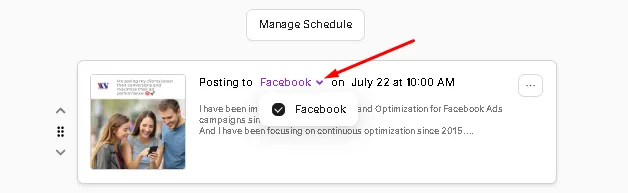
To unselect social for a specific post, Go to Posts - Scheduled - You will see posting to and the dropdown button) uncheck the socials you don't want to post
Check out how we use Marky to promote Marky! From feature releases to upcoming events, generating engaging content has never been easier. 🚀
Ready to see it in action? Unselect a Social for Specific Posts for free today and share your creations with us!
Connect with us:Website: mymarky.ai
Facebook: facebook.com/mymarkyai
Marky Community : https://www.facebook.com/groups/297633376571643/
TikTok: tiktok.com/@mymarkyai
Instagram: instagram.com/mymarky.ai
LinkedIn: linkedin.com/company/mymarky
Youtube: https://www.youtube.com/@MyMarkyAI
We hope you enjoy the Unselect a Social feature.
If you have any questions or need further assistance, please don't hesitate to reach out to me or our support team.
Josiah, CEO