
Your jobs posts go to Facebook and Instagram, but your hiring posts go to LinkedIn too. Ticking the same boxes every time is slow, and it's easy to miss one. Save each group once as a channel set.
How to save a set
Step 1
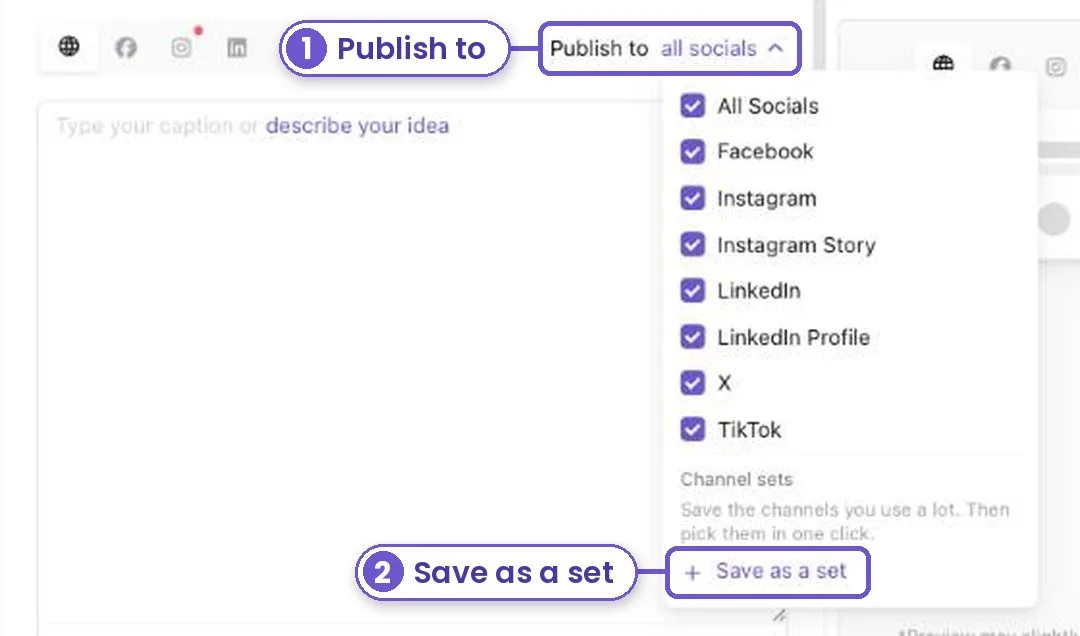
In a post, tap the accounts next to Publish to.
Step 2
Tick the accounts you want. Then tap Save as a set and give it a name, like "Jobs" or "Hiring".
Step 3
Next time, open the same picker and tap your set. All its accounts are picked at once. If you later remove an account, the set skips it and tells you.
What you get
Each post lands on the right accounts, with one click and no missed boxes.