
You only use Instagram for your business. You do not want to set up Facebook just to post. On a computer, you do not have to.
Connect with Instagram only
Step 1
Make sure your Instagram is a Business account. Switching is free and takes about a minute in the Instagram app.
Step 2
On a computer, open Workspace in the left menu, then Profile. Find Connect a social account and click Connect next to Instagram Business.
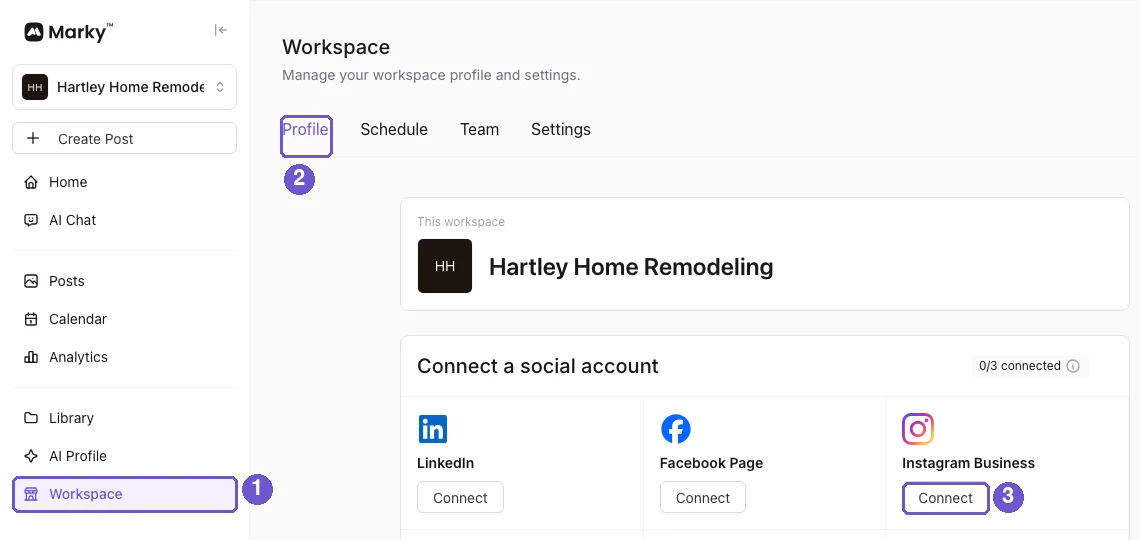
In the picture: 1 is Workspace, 2 is Profile, 3 is Connect next to Instagram Business.
Step 3
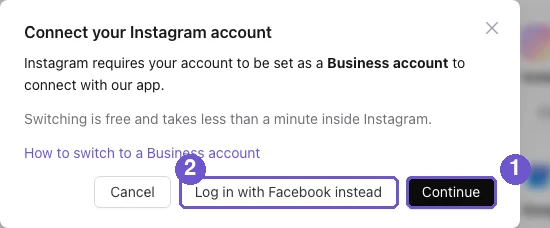
Click Continue. Log in with Instagram and say yes to the questions. When you come back, Instagram shows under Connected social accounts. No Facebook Page needed.
Using your phone's browser?
Phone browsers use Facebook to log in, so you will need a Facebook Page linked to your Instagram. Easiest fix: connect from a computer. On a computer you can also click Log in with Facebook instead if you prefer that way.
Having trouble? See How to fix socials not connecting.
What you get
Instagram posts go out on time, with one less account to look after.